Intro post:
When building or scaling an online store, competitor analysis is a proven shortcut to growth. But finding a reliable Shopify app/theme detector that does not slow down your computer or lock key features behind a paywall can be surprisingly difficult.
Many store owners searching for a Koala Inspector free alternative end up frustrated by restrictive daily scan caps, heavy browser plugins, or forced email registrations. To help you bypass the noise, I spent time testing popular Shopify detection tools and found that the differences in speed, privacy, and accuracy were massive.
Why Store Owners Need a Shopify App and Theme Detector
A Shopify app and theme detector helps store owners understand what successful competitors are using behind the scenes. Instead of guessing which theme powers a high-converting storefront or manually digging through source code, a detector gives you a faster starting point.
This is especially useful when researching:
- Which Shopify theme a competitor uses
- What apps support reviews, upsells, subscriptions, popups, or bundles
- Whether a store uses a free, premium, or custom theme
- How leading brands structure their tech stack
- Which tools may be worth testing for your own store
For new store owners, this can shorten the learning curve. For established merchants, it can reveal optimization ideas that are already working in the market.
What I Found When Testing Koala Inspector
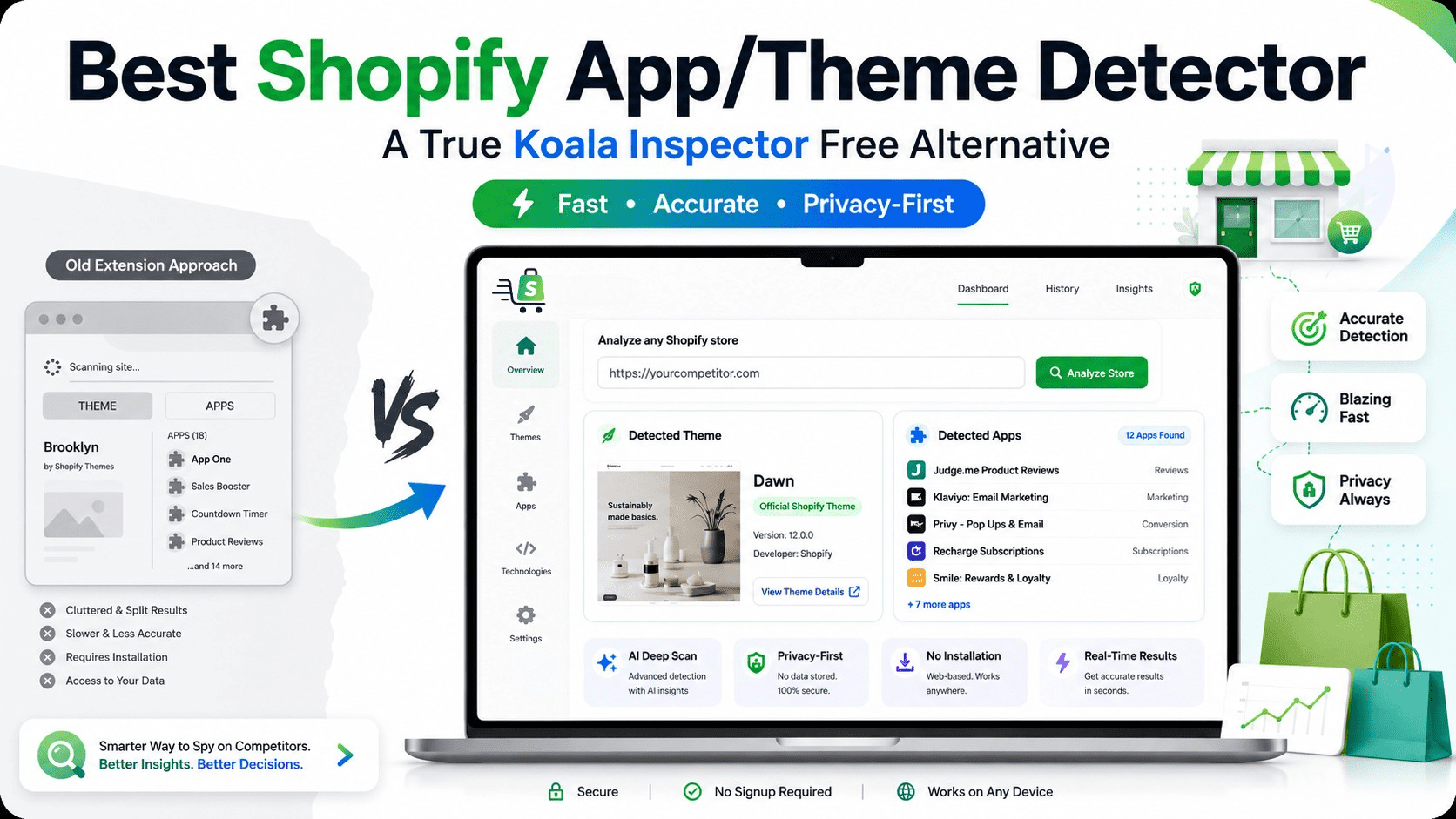
Koala Inspector is frequently recommended in Shopify communities, so I gave it a fair run. The first issue is that it does not offer a single, unified Shopify app/theme detector. Instead, it splits the functionality into two separate tools: you run one scan to detect the theme and a different scan to detect the installed apps. That alone adds unnecessary friction to competitor research.
More importantly, the results were inconsistent. On several stores I tested, the theme detection returned either the wrong theme name or flagged it as unknown when the theme was clearly identifiable by checking the page source manually. The app detection was similarly unreliable, missing active apps or listing ones that appeared to have already been uninstalled.
On top of that, Koala Inspector only works as a Chrome browser extension. Having to download software, grant it permissions, and deal with browser lag is a high price to pay for basic store analysis.
For users who only need quick competitor research, that setup feels unnecessarily heavy.
What Makes a Good Koala Inspector Free Alternative?
Not every Shopify detector is equally useful. A strong Koala Inspector free alternative should be fast, accurate, private, and simple enough to use without technical knowledge.
The best tools should include:
- No browser extension requirement: A web-based tool is easier to use and avoids unnecessary browser permissions.
- Theme and app detection in one place: Users should not need to run separate scans for basic competitor research.
- Reliable results: The tool should correctly identify free, premium, custom, or unknown themes.
- No forced signup: Competitor research should not require handing over an email address.
- Official app and theme links: Direct Shopify links make it easier to verify results and avoid unsafe third-party downloads.
- Clean interface: A detector should save time, not overwhelm users with ads, popups, or distractions.
This is where ShopSideK stands out as a practical option for merchants who want quick insights without installing anything.
The Search for a Better Solution: ShopSideK’s Detector
After my disappointing run with Koala Inspector, I tested the free Shopify Theme & App Detector by ShopSideK. As a web-based alternative, the difference in user experience was immediate.
Here is how it contrasts with extension-based options:
Zero Installation & Privacy-First: There is no extension to install, no sign-up required, and no data-tracking. You simply visit the site, paste the URL, and get results in seconds.
Unified & Accurate Results: In my testing across the same stores, the ShopSideK detector identified the correct themes each time. It compiles theme names, theme types such as free, premium, or custom, and active apps into a single, clean results view.
Deep Scan with AI: When dealing with headless commerce or heavily customized setups, the tool features a togglable AI deep scan option to dig deeper into the source code for maximum accuracy.
Direct Official Links: Identified themes and apps include direct links to the official Shopify Theme and App Stores, allowing you to review features, pricing, and install them safely with a single click.
Koala Inspector vs ShopSideK: Feature Comparison
| Feature | Koala Inspector | ShopSideK Detector |
| Web-based tool | No, Chrome extension required | Yes |
| Installation needed | Yes | No |
| Detects Shopify themes | Yes | Yes |
| Detects Shopify apps | Yes | Yes |
| Unified app and theme scan | Limited | Yes |
| Requires browser permissions | Yes | No |
| Free to use | Limited | Yes |
| AI deep scan option | Not the main focus | Yes |
| Direct official Shopify links | Limited | Yes |
| Best for | Extension users | Fast, private web-based research |
For users who prefer lightweight tools, ShopSideK is the more convenient choice. It avoids the friction of installing an extension while still delivering the core information most Shopify merchants are looking for.
How to Use ShopSideK’s Shopify App/Theme Detector
Using ShopSideK’s detector is simple, even if you are not technical.
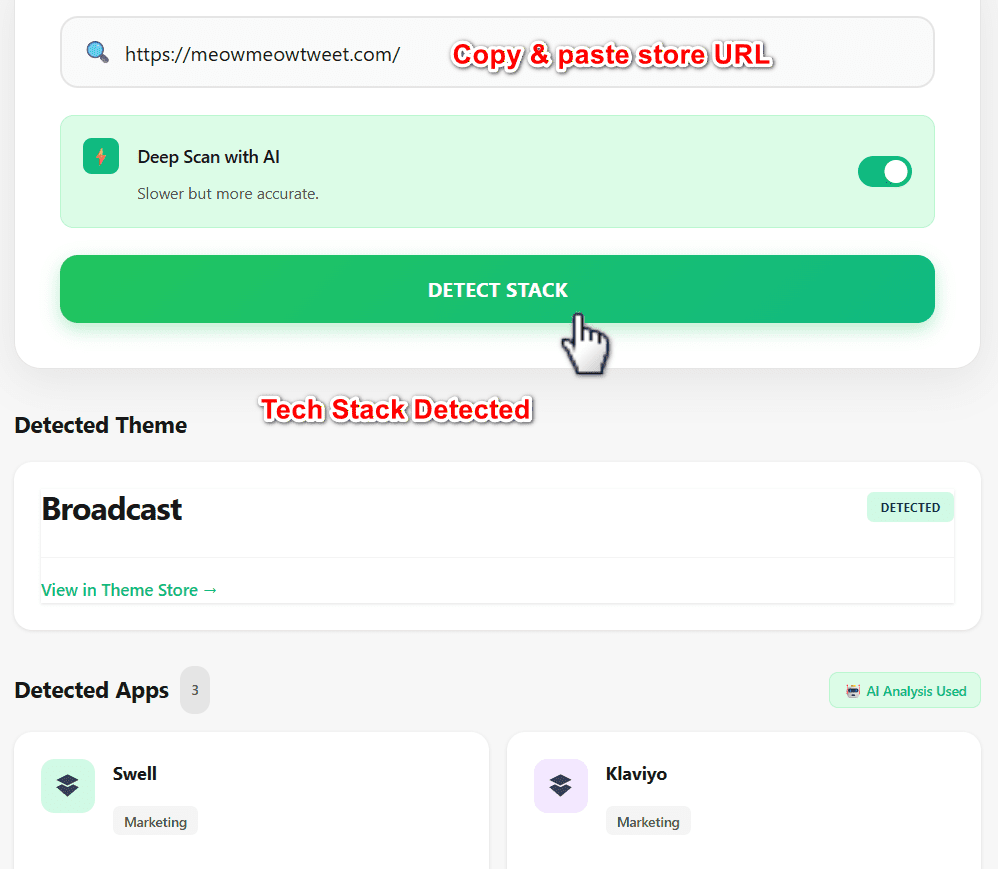
First, copy the URL of the Shopify store you want to analyze. Then paste the URL into the ShopSideK Shopify Theme & App Detector. Run the scan and review the results in the dashboard.
The tool will show key details such as the detected theme, whether the theme appears to be free, paid, or custom, and which Shopify apps are likely active on the store. When available, it also provides official links so you can explore the detected apps and themes directly.
For heavily customized stores, you can enable the AI deep scan option. This is useful when basic detection is not enough, especially for brands using custom code, headless storefronts, or modified premium themes.
When Should You Use a Shopify Detector?
A Shopify detector is useful at multiple stages of building and scaling an e-commerce business.
If you are launching a new store, it can help you discover themes used by brands in your niche. This gives you design inspiration and helps you understand what kind of storefront experience customers may already expect.
If you already run a Shopify store, a detector can help you research competitors before adding new apps. For example, you may notice several successful stores using product review apps, bundle builders, loyalty tools, or subscription apps. That does not mean you should copy them blindly, but it gives you a useful shortlist to investigate.
If you are redesigning your store, theme detection can also help you compare layouts, navigation styles, product page structures, and conversion-focused features across competing brands.
Overcoming Skepticism
It is natural to be skeptical of free tools. Often, “free” means selling user data, limiting useful features, or rendering incomplete results. However, this detector establishes credibility by performing real-time, transparent code analysis.
If a store uses a fully custom-built theme, such as Allbirds or Gymshark, the tool accurately flags it as custom rather than giving a false guess. Tested user feedback highlights its speed and clean, distraction-free interface as major upgrades over traditional, ad-heavy alternatives.
That transparency matters. A good Shopify detector should not pretend to know something it cannot verify. If a theme is custom, heavily modified, or difficult to identify, the better answer is an honest classification rather than a misleading result.
Common Mistakes to Avoid When Analyzing Competitor Stores
A Shopify app/theme detector is powerful, but it should be used as a research tool, not a copy machine.
One common mistake is assuming that every detected app is responsible for a store’s success. A competitor may use a review app or upsell app, but their results may also depend on branding, product quality, pricing, traffic sources, and customer retention.
Another mistake is installing too many apps at once. Shopify apps can improve functionality, but too many scripts may slow down your store or create conflicts. Use competitor research to identify patterns, then test only the tools that support your actual business goals.
Finally, avoid copying a competitor’s design too closely. Instead, use theme and app insights to understand what works, then build a store experience that fits your own brand.
Is ShopSideK Better Than a Chrome Extension?
For many users, yes. A web-based Shopify detector is often more convenient than a Chrome extension because it does not require installation, browser permissions, or ongoing updates.
Chrome extensions can be useful for frequent research, but they also add friction. Some users do not want another extension running in the background, especially when analyzing stores is only an occasional task. Others prefer not to grant browsing permissions just to detect a Shopify theme or app.
ShopSideK’s web-based approach is better suited for users who want quick, private, one-off scans. You paste a URL, get the results, and move on.
Who Should Use ShopSideK’s Shopify Detector?
ShopSideK’s detector is a good fit for Shopify beginners researching store examples, dropshippers analyzing winning stores, e-commerce agencies auditing client competitors, theme designers studying Shopify storefront trends, app developers researching app usage across niches, and store owners planning a redesign or app stack upgrade.
Because the tool combines app and theme detection, it is especially useful for users who want a complete snapshot of a store without switching between multiple tools.
Elevate Your Store’s Strategy
As e-commerce continues to evolve, staying updated with the latest tools and theme architectures is essential. Competitor research helps you understand what is already working, but the real value comes from applying those insights strategically.
Use Shopify app and theme detection to answer practical questions:
- Are successful stores in your niche using minimalist themes or feature-heavy layouts?
- Which review, upsell, loyalty, or subscription apps appear most often?
- Are competitors relying on custom themes, premium themes, or free Shopify themes?
- Which design patterns appear repeatedly across high-performing stores?
- What tools could support your own store’s growth without adding unnecessary complexity?
ShopSideK makes this research faster by giving you a clear view of both themes and apps in one place.
FAQ: Shopify App and Theme Detectors
What is a Shopify app/theme detector?
A Shopify app/theme detector is a tool that scans a Shopify store and identifies the theme, theme type, and apps that may be installed. It helps merchants research competitors and discover tools used by other online stores.
Is Koala Inspector free?
Koala Inspector offers free access, but users may run into limits or need to use its Chrome extension. For users looking for a simpler web-based option, ShopSideK can be a better free alternative.
Can a detector identify every Shopify app?
No detector can guarantee 100% app detection because some apps leave limited public code, while others may be hidden behind custom implementations. However, a strong detector can identify visible app scripts, theme signals, and other storefront clues.
Can a Shopify detector identify custom themes?
Yes, a good detector should be able to recognize when a store uses a custom or heavily modified theme. Instead of guessing incorrectly, it should clearly flag the theme as custom when there is not enough evidence for an exact match.
Is it safe to use a Shopify detector?
A web-based detector is generally safer and more convenient than installing an extension because it does not require browser permissions. With ShopSideK, you can scan a store URL without signing up or installing software.
Why is ShopSideK a good Koala Inspector alternative?
ShopSideK is a strong Koala Inspector alternative because it is web-based, free to use, privacy-friendly, and combines Shopify theme and app detection in one scan. It also includes AI deep scan functionality for more complex stores.
Final Verdict: The Best Free Koala Inspector Alternative
If you have been looking for an unrestricted Koala Inspector free alternative that respects your privacy and offers AI-powered precision, ShopSideK is one of the strongest options to consider.
It removes the biggest pain points of extension-based tools: no installation, no browser slowdown, no separate theme and app scans, and no unnecessary signup process. More importantly, it gives store owners a practical way to analyze competitors, optimize their tech stack, and make smarter Shopify decisions.
Try a Faster Way to Analyze Shopify Stores
If you want to research competitors without installing a browser extension, ShopSideK’s free Shopify Theme & App Detector is a simple place to start. Paste a store URL, run a scan, and instantly uncover the theme, app stack, and useful Shopify links behind the storefront.
Whether you are choosing your first theme, comparing competitor tools, or planning your next store upgrade, ShopSideK gives you the insights you need without signups, scan limits, or unnecessary browser permissions.


